The Arch Linux package management is great. But there are some things I had to change to fit my workflow. There are listed here.
Force yourself to read Arch news before upgrading
Arch Linux will sometimes upload package updates that will break your systems. On the top of my head, I can think of a grub update breaking my system in 2022, or linux-firmware in 2025.
While these breakages are rare, they can happen, and they can leave your computer unusable after an update. Arch Linux expects you to read the Arch News and be aware of them.
You can use the informant package to prevent this, that provides a pacman hook cancelling package upgrades when a new Arch news has been published.
After installing it, add yourself to the group using sudo usermod -aG informant $USER, and informant will check for new Arch news whenever you run an upgrade, and warn you.
Regularly clean orphaned packages
Installed packages have a flag tracking if they have been installed explicitely, or as a dependency.
When you uninstall a package, their dependencies won’t be automatically removed. You should periodically remove dependency packages for packages you uninstalled, by running pacman -R $(pacman -Qdtq).
⚠️ You should review the packages being uninstalled by the command, especially the first time you run it.
Automatically clear the package cache
By default, pacman and yay keep all (or a lot ?) of old package files you have installed.
pacman
pacman stores a package cache in /var/cache/pacman/pkg/. It can be cleared using paccache -r -k0. To execute that command automatically, we can use the following pacman hook:/etc/pacman.d/hooks/autoclean-pacman.hook
[Trigger]
Operation = Upgrade
Operation = Install
Type = Package
Target = *

[Action]
Description = Keep nothing in pacman cache
When = PostTransaction
Exec = /usr/bin/paccache -r -k0
If you want to keep the last N package versions built, you can change -k0 to -kN.
yay
yay cache is composed of 3 parts:
- the AUR package git repository (which we want to keep, to be able to diff the changes on the next upgrade, see later)
- The built packages (it is possible to keep old built packages, but in this article we will always delete them)
- Files generated during the build process (untracked files), e.g. when downloading a .deb file (we want to delete these).
The command yay -Sc --aur --noconfirm provides exactly this deletion behaviour, but unfortunately, clearing the yay cache is more complicated than pacman cache, for the following reasons:
yay will store AUR package cache in a user directory,
~/.cache/yay/. yay does not support hooks, and pacman hooks will execute as root (and so~will not point to the right directory). This can be solved in most cases by reading the $SUDO_USER variable to get the right folder.pacman hooks may run multiple times during a yay installation, for example if you install an AUR package that has a dependency on another package. In that case, yay will first download all packages, then install dependencies (which will trigger the hook and clean the AUR package data), and then try to build the AUR package, which will thus fail.
If the second problem didn’t exist, we could run a command like /usr/bin/sh -c 'su $SUDO_USER -c "yay -Sc --aur --noconfirm" as a pacman hook, but it would unfortunately cause yay to sometimes fail, as explain earlier.
To solve that problem, we will use a scheduled task using systemd instead, to clean the cache every 24 hours.
Create the following files:~/.config/systemd/user/autoclean-yay.service
[Unit]
Description=Daily yay cache cleanup

[Service]
Type=oneshot
ExecStart=yay -Sc --aur --noconfirm
StandardOutput=journal
StandardError=journal
~/.config/systemd/user/autoclean-yay.timer
[Unit]
Description=Daily timer for yay cache cleanup

[Timer]
OnCalendar=daily
Persistent=true

[Install]
WantedBy=timers.target
And enable the timer with
systemctl --user daemon-reload
systemctl --user enable --now autoclean-yay.timer
Review your installed packages
You should review the packages you explicitely installed from time to time, to clean up the ones you don’t use anymore. You can check packages you installed with yay -Qe.
This might yield a very long list that is complicated to review. To keep it simple, I like to run yay -Que, which will only list explicitly installed packages that have updated available.
That way, I only have to review small lists at a time, and reduce my updates download size.
AUR hygiene
As you probably already know, AUR packages are maintained by users. This means that anyone could create/update a package with malicious content, that you would then run on your computer (potentially as soon as you install it, thanks to package installation hooks !)
There are steps you can take to limit this:
Limit your usage of the AUR
You should only install AUR packages when no other sources is available. Prefer official Arch packages when available.
Alternatively, look for official AppImages, Flatpak, or AUR packages officially maintained by the software author.
The key here is that you should limit the number of people you trust. And since you plan to install a software from an editor, you already trust them (to not give you malicious code). Also using them as a source for software packages reduces the number of people you have to trust.
You should also periodically review the AUR packages you use with pacman -Qm
Review changes to AUR packages
when installing an AUR package, yay will automatically prompt you to review changes. To make sure you always check changes, you can configure yay to automatically show them:~/.config/yay/config.json
{
  "answerdiff": "a"
}
A good AUR package (scripts that live inside the AUR repository excluded) should only lightly change most of the time, updating version and checksums, making it easy for you to review them, and see if any suspicious changes were introduced.
Here is what most diffs should look like: 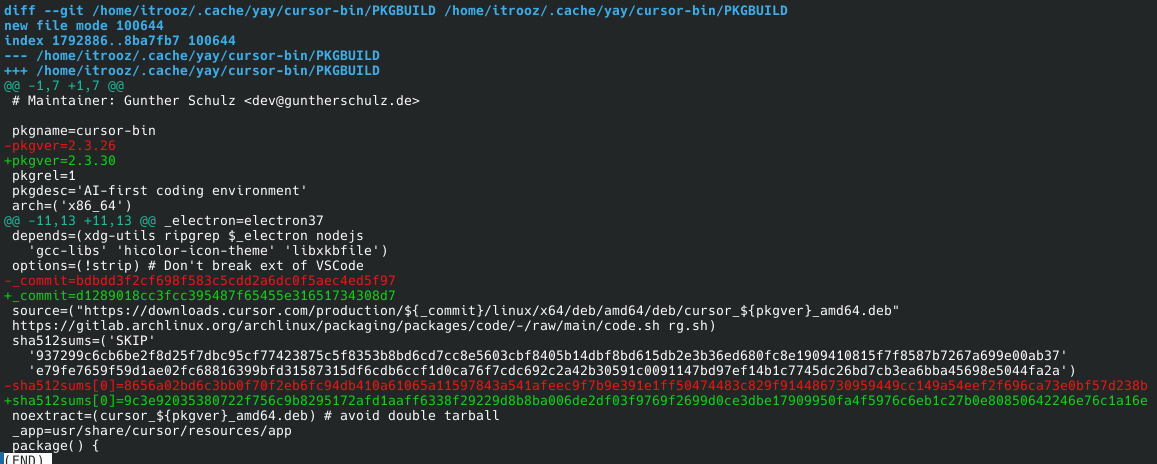
Pro-tip: I also add "answerclean": "n" to skip the second prompt.